Co-host with srsRAN
Ella Core can be hosted with 5G radio software like srsRAN to operate an all-in-one private 5G network. This guide provides step-by-step instructions to deploy Ella Core alongside srsRAN using a Linux network namespace.
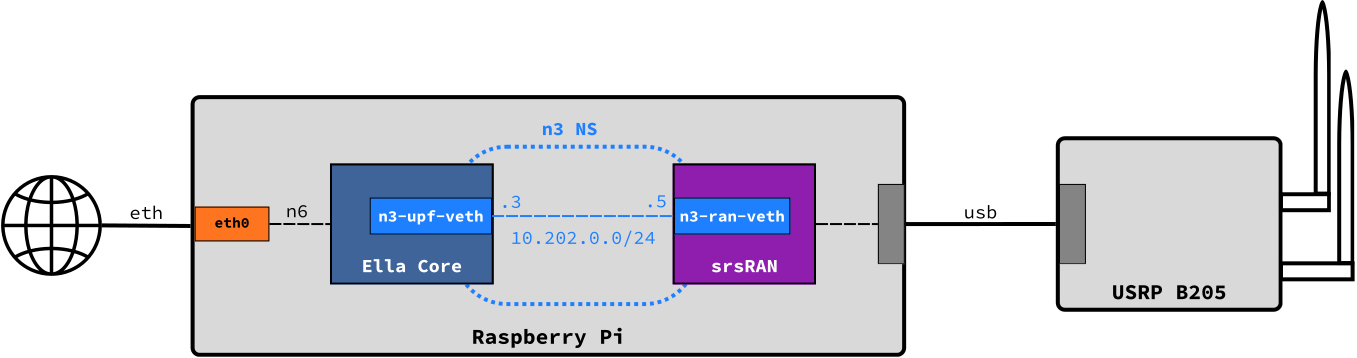
Pre-requisites
To follow this guide, you will need:
- A host with a network interface
- An srsRAN-compatible SDR
The instructions below were written for a Raspberry Pi 5 running Ubuntu 24.04 as the host and the Ettus Research B205-mini as the SDR. Please adapt the interface names and SDR configuration as needed for your setup.
1. Install Ella Core and srsRAN
Install Ella Core using the How-to Install guide and install srsRAN using the official documentation.
2. Create a network namespace for N3
Create a linux network namespace n3ns for the N3 interface between srsRAN and Ella Core's N6 interface.
ip netns add n3ns
ip link add n3-upf-veth type veth peer name n3-ran-veth
ip link set n3-ran-veth netns n3ns
ip addr add 10.202.0.3/24 dev n3-upf-veth
ip -n n3ns addr add 10.202.0.5/24 dev n3-ran-veth
ip -n n3ns link set lo up
ip -n n3ns link set dev n3-ran-veth up
ip link set dev n3-upf-veth up
3. Configure Ella Core
Configure Ella Core's N3 and N3 interfaces to use the n3ns namespace and set N6 to the physical interface eth0:
logging:
  system:
    level: "debug"
    output: "stdout"
  audit:
    output: "stdout"
db:
  path: "core.db"
interfaces:
  n2:
    name: "n3-upf-veth"
    port: 38412
  n3:
    name: "n3-upf-veth"
  n6:
    name: "eth0"
  api:
    address: "0.0.0.0"
    port: 5002
xdp:
  attach-mode: "generic"
telemetry:
  enabled: false
Note
We use generic mode here because the Raspberry Pi 5's built-in NIC does not support native XDP. If your host's NIC supports native XDP, set attach-mode to native.
Start Ella Core:
sudo snap start ella-core
4. Configure srsRAN
Configure srsRAN's CU to use the n3ns namespace:
cu_cp:
  amf:
    addr: 10.202.0.3
    port: 38412
    bind_addr: 10.202.0.5
    supported_tracking_areas:
      - tac: 1
        plmn_list:
          - plmn: "99901"
            tai_slice_support_list:
              - sst: 1
  inactivity_timer: 300
  security:
    nea_pref_list: nea2,nea1
    nia_pref_list: nia2,nia1
cu_up:
  ngu:
    socket:
      - bind_addr: 10.202.0.5
ru_sdr:
  device_driver: uhd
  device_args: type=b200
  clock: internal
  srate: 23.04
  tx_gain: 80
  rx_gain: 40

cell_cfg:
  dl_arfcn: 665000
  band: 77
  channel_bandwidth_MHz: 20
  common_scs: 30
  plmn: "99901"
  tac: 1
  pdcch:
    dedicated:
      ss2_type: common
      dci_format_0_1_and_1_1: false
  prach:
    prach_config_index: 160
  pdsch:
    mcs_table: qam64
  pusch:
    mcs_table: qam64

log:
  filename: /tmp/gnb.log
  all_level: info

pcap:
  mac_enable: enable
  mac_filename: /tmp/gnb_mac.pcap
  ngap_enable: enable
  ngap_filename: /tmp/gnb_ngap.pcap
Start srsRAN in the n3ns namespace:
sudo ip netns exec n3ns ./gnb -c gnb.yaml
You should see srsRAN logs indicating successful connection to Ella Core
--== srsRAN gNB (commit 3ed363dabf) ==--

srsLog error - Unable to create log file "/tmp/gnb.log": Permission denied
Lower PHY in dual baseband executor mode.
Available radio types: uhd.
[INFO] [UHD] linux; GNU C++ version 13.2.0; Boost_108300; UHD_4.6.0.0+ds1-5.1ubuntu0.24.04.1
[INFO] [LOGGING] Fastpath logging disabled at runtime.
Making USRP object with args 'type=b200'
[INFO] [B200] Detected Device: B205mini
[INFO] [B200] Operating over USB 3.
[INFO] [B200] Initialize CODEC control...
[INFO] [B200] Initialize Radio control...
[INFO] [B200] Performing register loopback test...
[INFO] [B200] Register loopback test passed
[INFO] [B200] Setting master clock rate selection to 'automatic'.
[INFO] [B200] Asking for clock rate 16.000000 MHz...
[INFO] [B200] Actually got clock rate 16.000000 MHz.
[INFO] [MULTI_USRP] Setting master clock rate selection to 'manual'.
[INFO] [B200] Asking for clock rate 23.040000 MHz...
[INFO] [B200] Actually got clock rate 23.040000 MHz.
Cell pci=1, bw=20 MHz, 1T1R, dl_arfcn=665000 (n77), dl_freq=3975 MHz, dl_ssb_arfcn=665088, ul_freq=3975 MHz

N2: Connection to AMF on 10.202.0.3:38412 completed
==== gNB started ===