Co-host with OCUDU
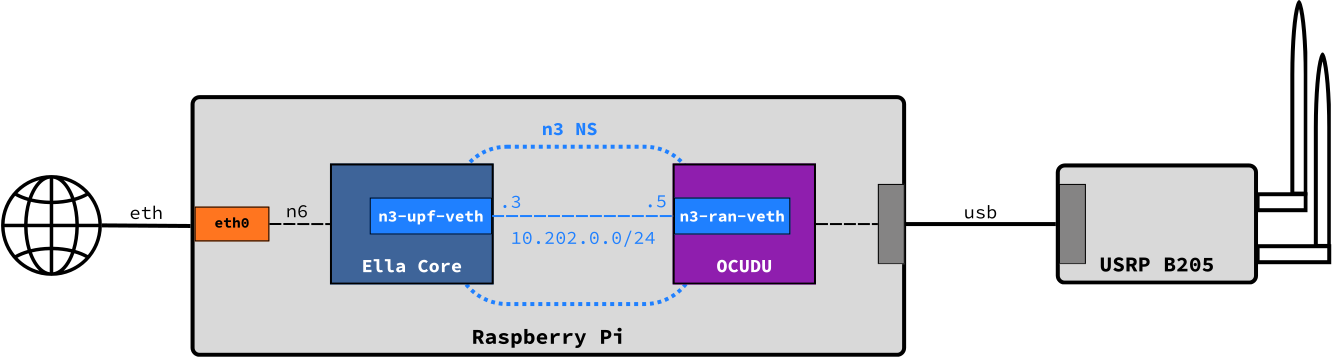
Ella Core can be hosted with radio software like OCUDU (previously known as srsRAN) to operate an all-in-one private mobile network. This guide provides step-by-step instructions to deploy Ella Core alongside OCUDU using a Linux network namespace.
Note
The same instructions can be used to co-host Ella Core with srsRAN 4G.
Pre-requisites
To follow this guide, you will need:
- Ubuntu Server 26.04
- A host with a wired network interface
- A USB, UHD-compatible SDR
The instructions below were written for a Raspberry Pi 5 running Ubuntu 26.04 and the Ettus Research B205-mini SDR. Please adapt the interface names and SDR configuration as needed for your setup.
Tip
OCUDU requires some performance tuning for stable operation, especially on resource-constrained hosts like a Raspberry Pi. We recommend the following optimizations for OCUDU performance:
- Use Ubuntu Real-Time (following documentation)
- Use a high real-time scheduling priority (with chrt)
1. Install Ella Core and OCUDU
Install Ella Core using the How-to Install guide and install OCUDU using the snap:
sudo snap install ocudu
sudo snap connect ocudu:kernel-module-observe
sudo snap connect ocudu:process-control
sudo snap connect ocudu:network-control
sudo snap connect ocudu:system-observe
sudo snap connect ocudu:raw-usb
2. Create a network namespace for N3
Create a linux network namespace n3ns for the N3 interface between OCUDU and Ella Core.
Install the OCUDU performance script:
sudo curl -o /usr/local/bin/ocudu_performance https://gitlab.com/ocudu/ocudu/-/raw/dev/scripts/ocudu_performance
sudo chmod +x /usr/local/bin/ocudu_performance
Create /etc/systemd/system/n3ns.service:
[Unit]
Description=N3 Network Setup
Wants=network-online.target
After=network-online.target

[Service]
Type=oneshot
RemainAfterExit=true

ExecStartPre=-ip netns delete n3ns
ExecStart=ip netns add n3ns
ExecStart=ip link add n3-upf-veth type veth peer name n3-ran-veth
ExecStart=ip link set n3-ran-veth netns n3ns
ExecStart=ip addr add 10.202.0.3/24 dev n3-upf-veth
ExecStart=ip -n n3ns addr add 10.202.0.5/24 dev n3-ran-veth
ExecStart=ip -n n3ns link set lo up
ExecStart=ip -n n3ns link set dev n3-ran-veth up
ExecStart=ip link set dev n3-upf-veth up
ExecStart=ethtool -K eth0 gro off
ExecStart=ip netns exec n3ns ethtool -K n3-ran-veth tso off gso off
ExecStart=/usr/local/bin/ocudu_performance -y
ExecStop=-ip netns delete n3ns

[Install]
WantedBy=multi-user.target
Enable and start the service:
sudo systemctl daemon-reload
sudo systemctl enable --now n3ns.service
Make sure eth0 is not optional in /etc/netplan/50-cloud-init.yaml:
network:
  version: 2
  ethernets:
    eth0:
      dhcp4: true
      optional: false
Apply the Netplan configuration:
sudo netplan apply
3. Configure Ella Core
Configure Ella Core's N3 and N3 interfaces to use the n3ns namespace and set N6 to the physical interface eth0:
logging:
  system:
    level: "debug"
    output: "stdout"
  audit:
    output: "stdout"
db:
  path: "/var/snap/ella-core/common/data/ella.db"
interfaces:
  n2:
    name: "n3-upf-veth"
    ngap-port: 38412
  n3:
    name: "n3-upf-veth"
  n6:
    name: "eth0"
  api:
    address: "0.0.0.0"
    port: 5002
datapath:
  attach-mode: "tcx"
telemetry:
  enabled: false
Note
We use tcx mode here because the Raspberry Pi 5 does not support native XDP. Use xdp-native if you can and follow the Use native XDP with veth interfaces guide to attach an XDP program to the peer veth.
Create the override file /etc/systemd/system/snap.ella-core.cored.service.d/override.conf:
[Unit]
Requires=n3ns.service
Wants=network-online.target
After=n3ns.service network-online.target
Reload systemd and start Ella Core:
sudo systemctl daemon-reload
sudo snap start --enable ella-core.cored
4. Configure OCUDU
Configure OCUDU's CU to use the n3ns namespace:
cu_cp:
  amf:
    addr: 10.202.0.3
    port: 38412
    bind_addr: 10.202.0.5
    supported_tracking_areas:
      - tac: 1
        plmn_list:
          - plmn: "99901"
            tai_slice_support_list:
              - sst: 1
  inactivity_timer: 300
  security:
    nea_pref_list: nea2,nea1
    nia_pref_list: nia2,nia1
cu_up:
  ngu:
    socket:
      - bind_addr: 10.202.0.5
ru_sdr:
  device_driver: uhd
  device_args: type=b200
  clock: internal
  srate: 23.04
  tx_gain: 80
  rx_gain: 40

cell_cfg:
  dl_arfcn: 665000
  band: 77
  channel_bandwidth_MHz: 20
  common_scs: 30
  plmn: "99901"
  tac: 1
  pdcch:
    dedicated:
      ss2_type: common
      dci_format_0_1_and_1_1: false
  prach:
    prach_config_index: 160
  pdsch:
    mcs_table: qam64
  pusch:
    mcs_table: qam64

log:
  filename: stdout
  all_level: warning

pcap:
  mac_enable: disable
  ngap_enable: disable
Save this configuration to /var/snap/ocudu/common/gnb.yml.
Override the ocudu gnb service by writing /etc/systemd/system/snap.ocudu.gnb.service.d/override.conf:
[Service]
NetworkNamespacePath=/var/run/netns/n3ns
Enable and start OCUDU:
sudo systemctl daemon-reload
sudo snap start --enable ocudu.gnb
You should see the LEDs light up on your USRP, and see the radio appear in Ella Core's UI.
You can validate OCUDU is running properly by looking at the logs:
sudo snap logs ocudu -n 1000 -f