Skip to content

Deploy a High Availability Cluster (beta)

This guide walks through bringing up a three-node Ella Core cluster from scratch. For background on how clustering works, see the High Availability explanation.

Beta feature

High availability is currently in beta. It is available for testing and feedback in the main branch but not recommended for production use yet. Expect breaking changes as we iterate on the design and implementation.

Pre-requisites

  • Three hosts that each meet the standard system requirements.
  • Ella Core installed on each host following the Install guide. Do not start the service yet.
  • A reachable TCP port on each host for inter-node traffic (this guide uses 7000).

1. Generate the cluster PKI

Every node authenticates to its peers with a leaf certificate signed by a shared cluster CA. The leaf's Common Name must be ella-node-<node-id>, where node-id matches cluster.node-id in the node's config. node-id must be between 1 and 63.

Using OpenSSL, create a CA and one leaf per node:

# Cluster CA
openssl ecparam -name prime256v1 -genkey -noout -out cluster-ca-key.pem
openssl req -x509 -new -key cluster-ca-key.pem -days 3650 \
    -subj "/CN=ella-cluster-ca" -out cluster-ca.pem

# Per-node leaf (repeat for node-id 1, 2, 3)
NODE_ID=1
openssl ecparam -name prime256v1 -genkey -noout -out node-${NODE_ID}-key.pem
openssl req -new -key node-${NODE_ID}-key.pem \
    -subj "/CN=ella-node-${NODE_ID}" -out node-${NODE_ID}.csr
openssl x509 -req -in node-${NODE_ID}.csr \
    -CA cluster-ca.pem -CAkey cluster-ca-key.pem -CAcreateserial \
    -days 365 -out node-${NODE_ID}-cert.pem \
    -extfile <(printf "extendedKeyUsage=serverAuth,clientAuth")

Copy cluster-ca.pem, the node's own node-N-cert.pem, and node-N-key.pem to each host (for example, under /etc/ella/).

2. Configure each node

On every node, add a cluster block to the configuration file. The example below is for node 1; change node-id, bind-address, and the TLS paths on each of the other two nodes. The peers list and bootstrap-expect must be identical on all three.

core.yaml
interfaces:
  n2:
    address: "10.0.0.1"
    port: 38412
  n3:
    name: "n3"
  n6:
    name: "eth0"
  api:
    address: "10.0.0.1"
    port: 5002
xdp:
  attach-mode: "native"
cluster:
  enabled: true
  node-id: 1
  bind-address: "10.0.0.1:7000"
  bootstrap-expect: 3
  peers:
    - "10.0.0.1:7000"
    - "10.0.0.2:7000"
    - "10.0.0.3:7000"
  tls:
    ca: "/etc/ella/cluster-ca.pem"
    cert: "/etc/ella/node-1-cert.pem"
    key: "/etc/ella/node-1-key.pem"

See the Configuration File reference for every available field.

3. Start the nodes

Start Ella Core on all three hosts, order does not matter.

shell sudo snap start --enable ella-core.cored

4. Initialize the cluster

Open any node's UI in a browser (for example https://10.0.0.1:5002) and create the first admin user when prompted. The write is replicated through Raft to the other members, so you only do this once.

Log in.

5. Verify the cluster

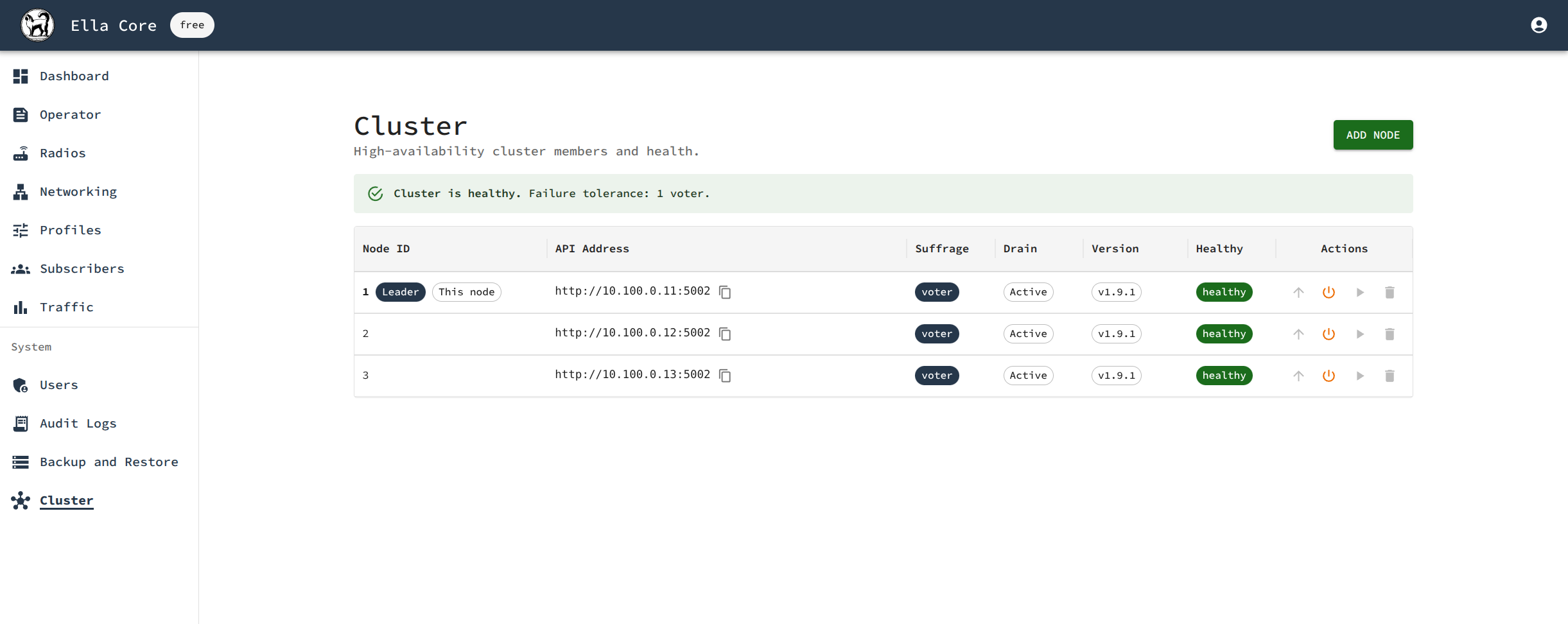
Navigate to the Cluster page. All three nodes should appear with suffrage Voter, one should be flagged as Leader, and every node should report Healthy.

Ella Core HA Cluster
Cluster page showing three nodes with one leader